FAQs for Doctors

প্রশ্নের উত্তর পেতে প্রশ্নের উপর ক্লিক করুন 👇

Question: How can I join Daktaro as a Doctor?

Thank you for your interest in Daktaro. You can join as a doctor anytime directly form our webpage.
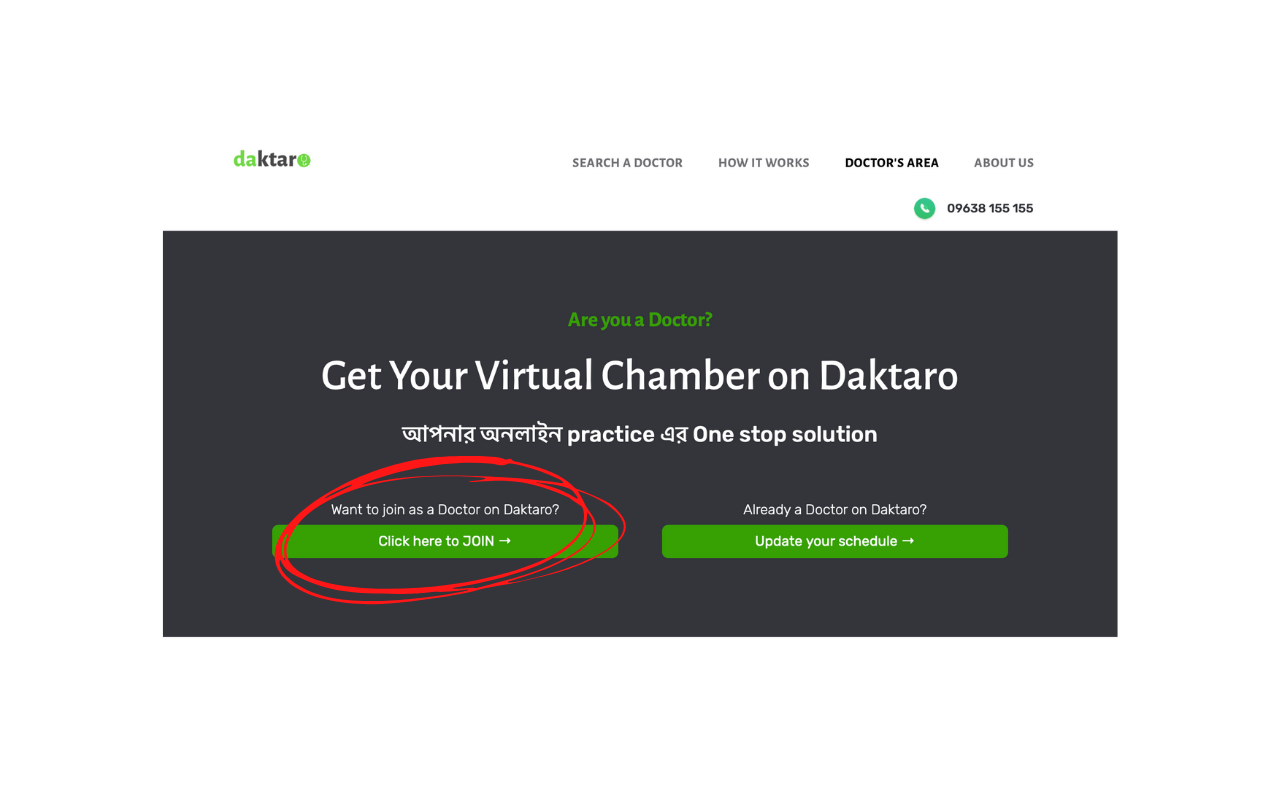
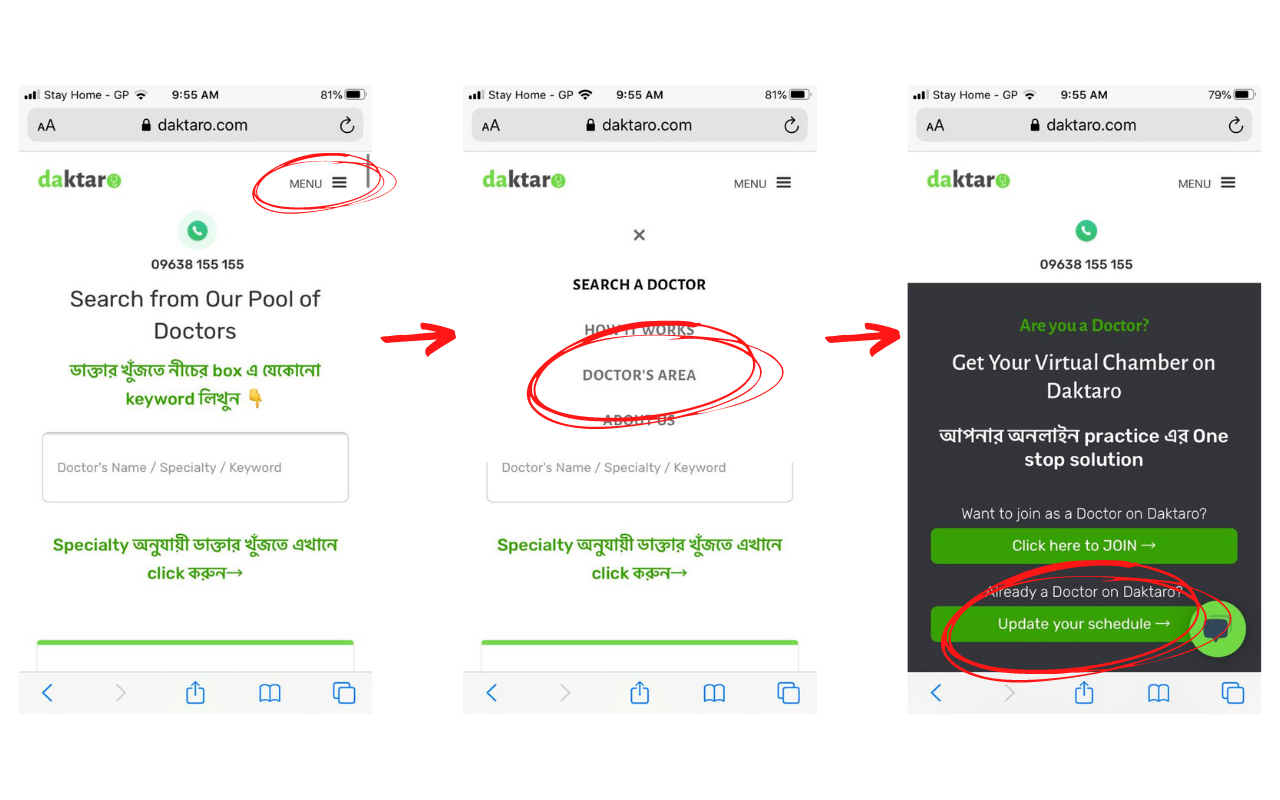
Just go to our webpage https://www.daktaro.com/ > Doctor's Area > Click here to Join
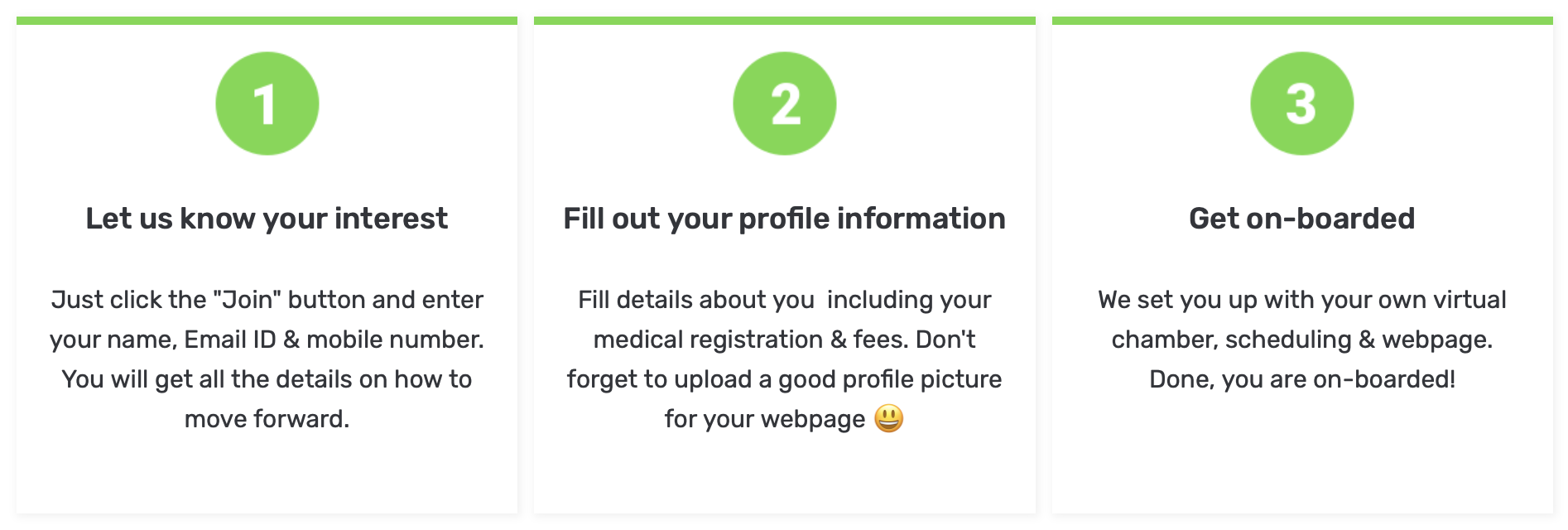
Once you submit your interest, you will instantly get the way forward sent to your Email. Submit your profile and practice information using the link in that Email. We will do everything necessary to On-board you to the platform and you can start your virtual consultation on Daktaro in no time.
Navigating using a Tab / Desktop? Here is how you can let us know you want to join→
Navigating using a Mobile? Here is how you can let us know you want to join→

Question: What are my benefits If I join Daktaro?

We understand your struggle and our platform is built to make your life easier. Here are the direct benefits you will get if you join Daktaro
Interested to join? Just go to our webpage https://www.daktaro.com/ > Doctor's Area > Click here to Join

Question: What will be my cost for joining Daktaro?

We only believe in a win-win partnership. On Daktaro you will not have any hidden, fixed, monthly or any other type of cost. We only take a certain percentage of the consultations you do on the Platform for facilitating the whole process and bringing patients to you without any hassle. So we only earn when you earn more.

You can set your own consultation fee and your own schedule. Whats better is we do not have any binding contract. You can leave the platform anytime you want as well. Here are all the details of yoru engagement with Daktaro:
Things to Remember:
We take commitments very seriously. We always give our best to hour our commitments both to doctors and patients. So we expect our doctors to honour the time they have allotted to us and see a patient on time when they have an appointment.

Question: How to do the Video Call with my patient?

Our one click video call link is an excellent way to connect to patients who are not Technologically very advanced. You can join the call from a mobile devise using the link in the SMS, or any tab or desktop using the link from your Email. All you have to do is:

1. Click the video link ON TIME of your appointment

2. Allow the audio and microphone access of your device

3. Done! You are connected. Wait for the other party if they are not connected yet

Any trouble? Just call our Helpline 09638155155
Things to remember:
If the network quality is poor at any end, you might experience problem with audio or/and video . You can always turn your video off or ask the patient to turn their video off if network is too bad. That way you can finish consultation on audio only.

Question: How can I send Prescription?

You can just write your prescription, take a picture, and upload through Daktaro prescription link. You will find Daktaro prescription link with the appointment confirmation SMS / Email. Once you upload the prescription, patient will get a link through SMS from where they can just download or view the prescription. It's that simple.
Things to Remember:
Please use your own pad / seal & sign when writing the prescription as it is a compliance requirement. Prescription written on white paper without any seal & sign will not be accepted.

Question: How can I see medical reports of my patients?

You can have everything in one SMS/Email. Link to medical reports (if any) sent by your patient will be attached with the SMS/Email sent to you once you have a confirmed appointment. You can just click the link and find the report under your patient's name.
Things to Remember:
It is recommended that you check the link before you start an appointment so that you have all the information needed to do an effective video consultation.

Question: How can I update my profile or consultation fee on Daktaro?

You can update your profile information, consultation fee, profile picture or any other detail anytime on Daktaro:

1. Write what you want to add/update/change EXACTLY and under which Heading

2. Send your request to doctors@daktaro.com

We will update your profile within 1 working day.

Question: How can I update my schedule on Daktaro?

You can change or update your schedule anytime on Daktaro. Just click the "Update your schedule" button from the Doctor's area of our website, submit your updated schedule. We will do what's necessary so that patients can book appointment according to your preferred time.
Just go to our webpage https://www.daktaro.com/ > Doctor's Area > Update your schedule
Navigating using a Tab / Desktop? Here is how you can update your Daktaro schedule→
Navigating using a Mobile? Here is how you can update your Daktaro schedule→